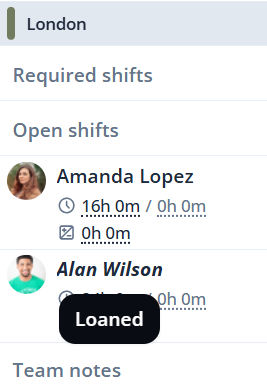
In Shiftbase, by default, employees can be scheduled in all teams within a department. A Flexpool allows you to schedule employees in another department, without them being permanently on the schedule.
The employee will not be visible on the schedule of that department, only when they are scheduled for that day. Use flexpools when:
- Employees do not belong on the schedule on a specific department permanently, but work there from time to time.
- Allowing the planners of other departments to borrow the employee.
How to set up a flexpool
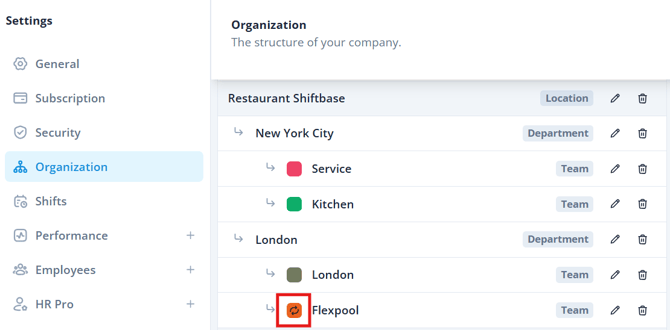
To create a flexpool, navigate in Shiftbase to Settings > Organisation. Here, you create a new team under the desired department an employee need to work in. Select Flexpool as "Type". The flexpool will be indicated with an icon with rotating arrows.
💡 Tip: Want the specific instruction on how to create Flexpool teams, click here.
Assigning employees to a flex pool
Once a flexpool is created in the desired department, employees can now be assigned to the flexpool, so they can be scheduled in that department.
Head to Employees > Team & Permissions. Here, you can now select the flexpool team.
💡 Tip: If you want a detailed guide on assigning teams, click here.
📝 Note: Employees cannot only be assigned to a flexpool team, they must have at least one default team.
Scheduling
Once the employee is assigned to a flexpool, they can now be scheduled in that department. When creating a schedule, the employee will now appear in the list of employees to choose from.
Click on the + icon to add a shift. When selecting Employee to assign, the flexpool employees can be selected.
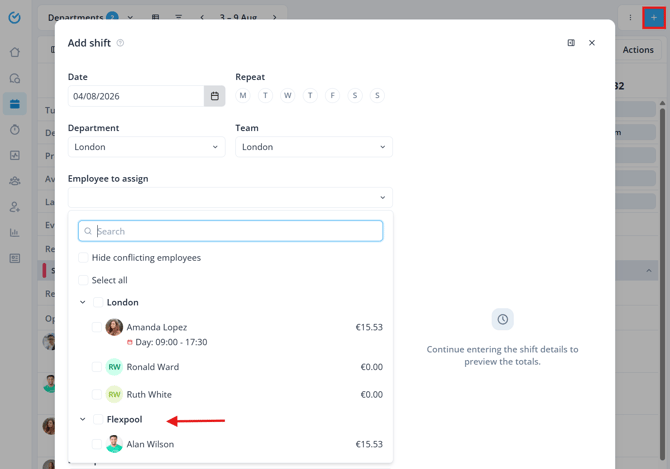
The employee is now in a borrowed state, indicated as Loaned.