-1.png?width=180&height=60&name=shiftbase-text-logo-transparent-dark%20(3)-1.png)

Within Shiftbase, it is possible to automatically check every schedule against working hours laws and collective agreements. You can think of the ATW (arbeidstijden wet) or the Horeca cao or Retail cao. Do you want to know which working hours laws and collective agreements are supported? Check here.
Contents
Activate the Compliance+ add-on
Assign rulesets to your contract types
Plan shifts as usual and fix issues with one click
Activate the Compliance+ add-on
In your subscription settings, you can enable the Compliance+ add-on. Navigate in Shiftbase to Settings > Subscription > Plan overview.
In the plan overview, click on edit and activate the add-on at the bottom of the model, now press on Continue to summary and Confirm change.

Assign rulesets to your contract types
When the Compliance+ add-on is activated in your account, you are now able to assign the rulesets to your different contract types. Go to the Settings > Employees > Contract types.
Within this overview, you can already see if a ruleset has been applied; if not, click on the pencil icon on the right side and select the desired Schedule compliance ruleset.

Plan shifts as usual and fix issues with one click
Once the Schedule compliance rulesets have been applied to all contract types, navigate to the Schedule tab. At the bottom of the screen, in the status bar, you will see a field called Violations.

This counter displays the number of violations of the Schedule compliance check in the current schedule for all visible departments.
An exclamation mark on a scheduled shift indicates a conflict or violation of the working hours law. By hovering your mouse over such a shift, you can determine whether it is a conflict or a violation.
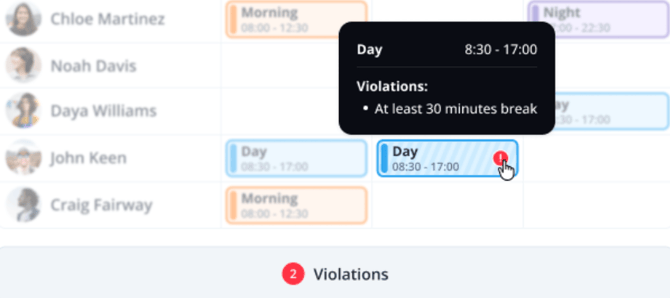
When adding, modifying, or removing a shift, it is immediately checked for compliance with the Schedule compliance check.
⚠️ Warning: The Schedule compliance check only works for upcoming periods and not for the past.